Troubleshooting
This is a short collection of issues Link helpdesks users may experience and how to get around them.
Received "account linked with third-party application" email
You may receive an email to let you know your account has been linked with a third-party application "OpenID Connect". This is the technology we use to implement single-sign on (SSO) and is expected the first time that you login to Link with your SSO account.
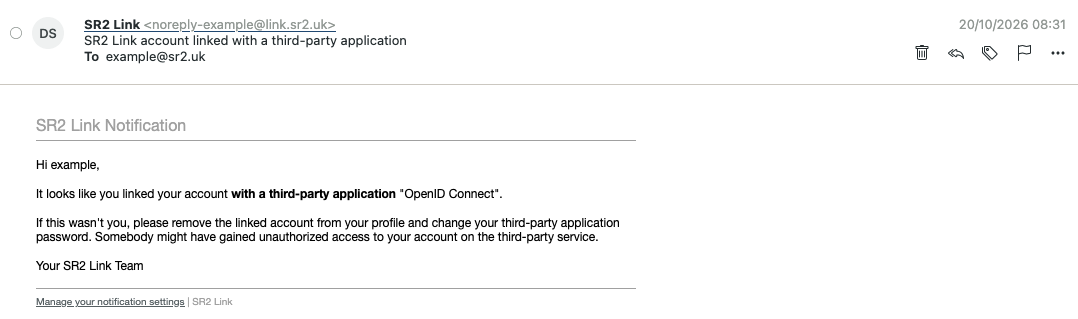
If you have received an email that references another third-party application, like "Google" or "Microsoft 365", then please get in touch immediately as your account may have been compromised. You should also get in touch if you have been using Link previously and have received this email a second time so that we may review the logs and confirm that your account is secure.
Received "login from a new device" email
You may receive an email to let you know your account was seen to have logged in from a new device. Please note that the location data is not currently accurate, and the location given next to the date and time relates to the timezone for that time, not the location the login was seen from. These emails can also be generated when logging in from the same device after clearing cookies, cache, or when using private browsing or a VPN.
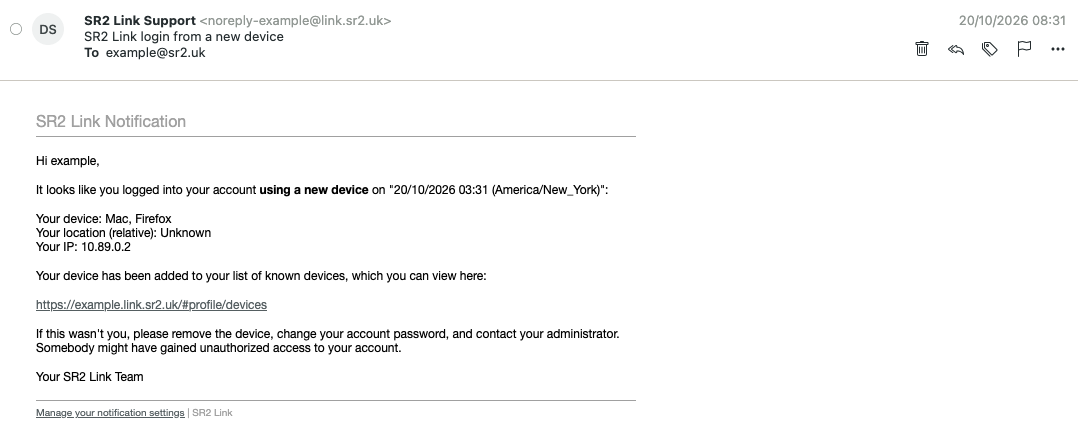
The emails will arrive very shortly after the new device was detected. If you were not using Link at that time please get in touch with us to confirm your account is secure. Even if you were not actively using Link, you may still receive this email if your browser software updates and restarts automatically. You can reduce these false alerts by logging out of Link at the end of each session.
My helpdesk is very slow or I see 504 errors
The Link helpdesk is a piece of software running on a server with a limited amount of memory and number of connections it can efficiently handle at once.
The slowness usually happens due to a combination of two factors:
- several agents on the helpdesk have many open ticket tabs in left hand side panel
- many of the tickets loaded in the side panel have a large amounts of messages
CDR Link allows users to connect on Whatsapp and Signal, where the conversation in a ticket can grow to many hundreds of messages. If several agents happen to keep such a large ticket open unnecessarily, it can harm performance for everyone working on the helpdesk.
It is always good practice to close ticket tabs when not actively working on a specific ticket.
If coordinating all agents to close their unused tickets in the side panel does not help with the slowness, please contact us.
Google mail not working, Oauth token expired
Instructions
First, someone with admin permissions in your Google organisation needs to navigate to https://console.cloud.google.com/apis/credentials and either refresh the existing token or create another set of Google Oauth 2.0 credentials.
To reconnect your Google email:
Remember that it is very important to not log in to the helpdesk with your personal admin/agent Google account as it will result in connecting your personal email with the helpdesk.
- Close all 'incognito' windows of your browser and open a new one.
- Open your helpdesk login page and log into it by pressing the 'Log in with Google' button.
- For login use the same Google email account that the customers will be using to communicate with the helpdesk.
- Please move the emails that you don't want to import into the helpdesk manually from the Inbox folder into another folder in your helpdesk Gmail account.
This will ensure that no automatic replies will be sent to your customers for existing tickets, as importing any email triggers an auto-reply to its customer. You can also turn off auto-replies while you reconnect for your peace of mind.
- Go to: Settings -> Channels -> Google and press the 'Reauthenticate' button.This will prompt you to reauthenticate into Google. Make sure the account you are connecting matches the helpdesk email rather than any personal email.
- Once authenticated, in the settings screen that comes up - set 'keep messages on server' to 'yes', unless you want the messages to be deleted from the mail provider once imported, and to exist only in Link.
Emails arrive in my Inbox but they don’t create tickets
Zammad is checking only New emails in the INBOX folder. Make sure you are not using any filters or rules that move mail to other folders in the email client. We recommend you do not access the mailbox outside of the Link connection, unless absolutely necessary or for debugging purposes.